
Now live: Release 3.5.0
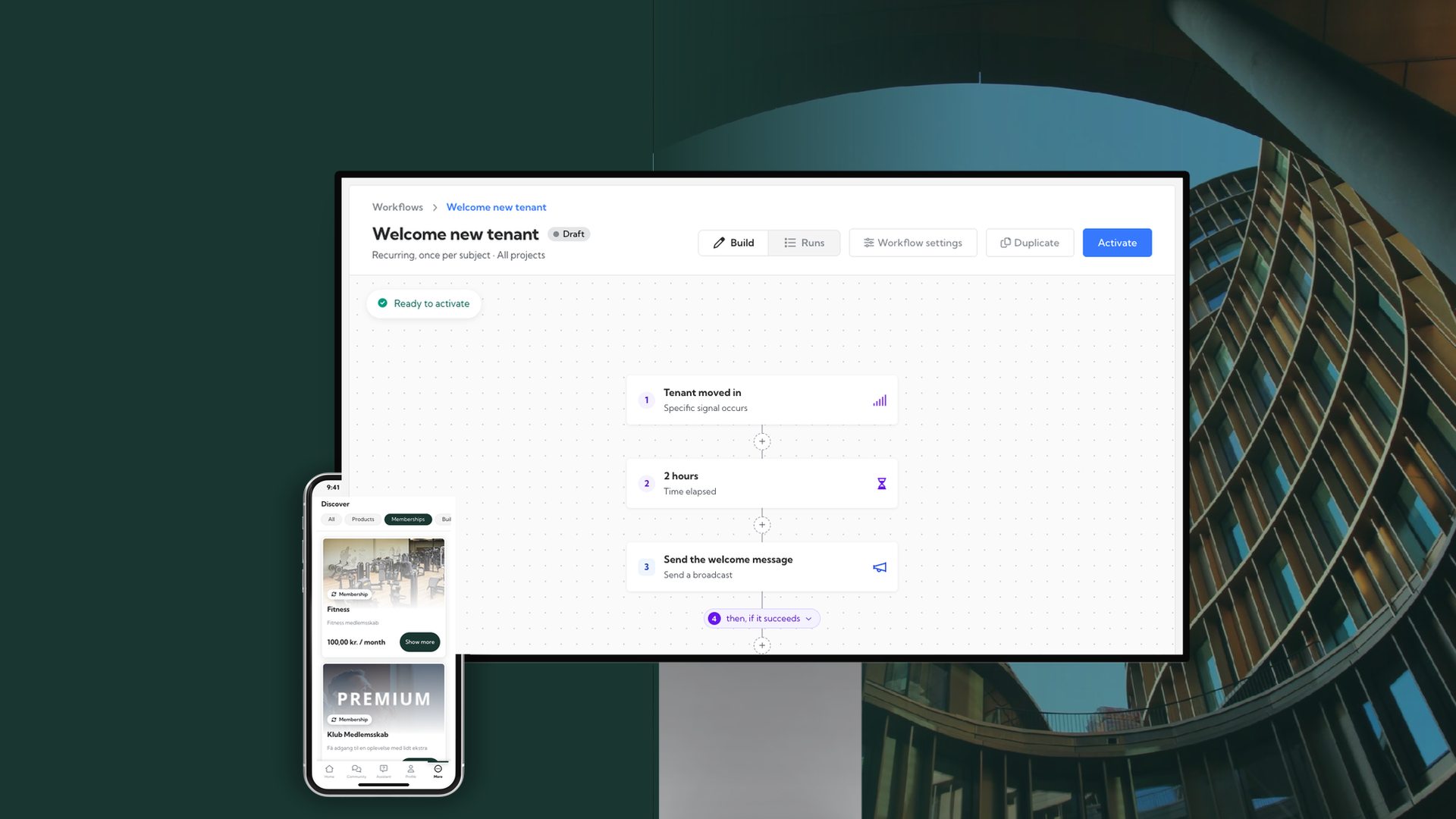
We're happy to announce that our latest release 3.5.0 is now live! Below you can read more about the changes below.
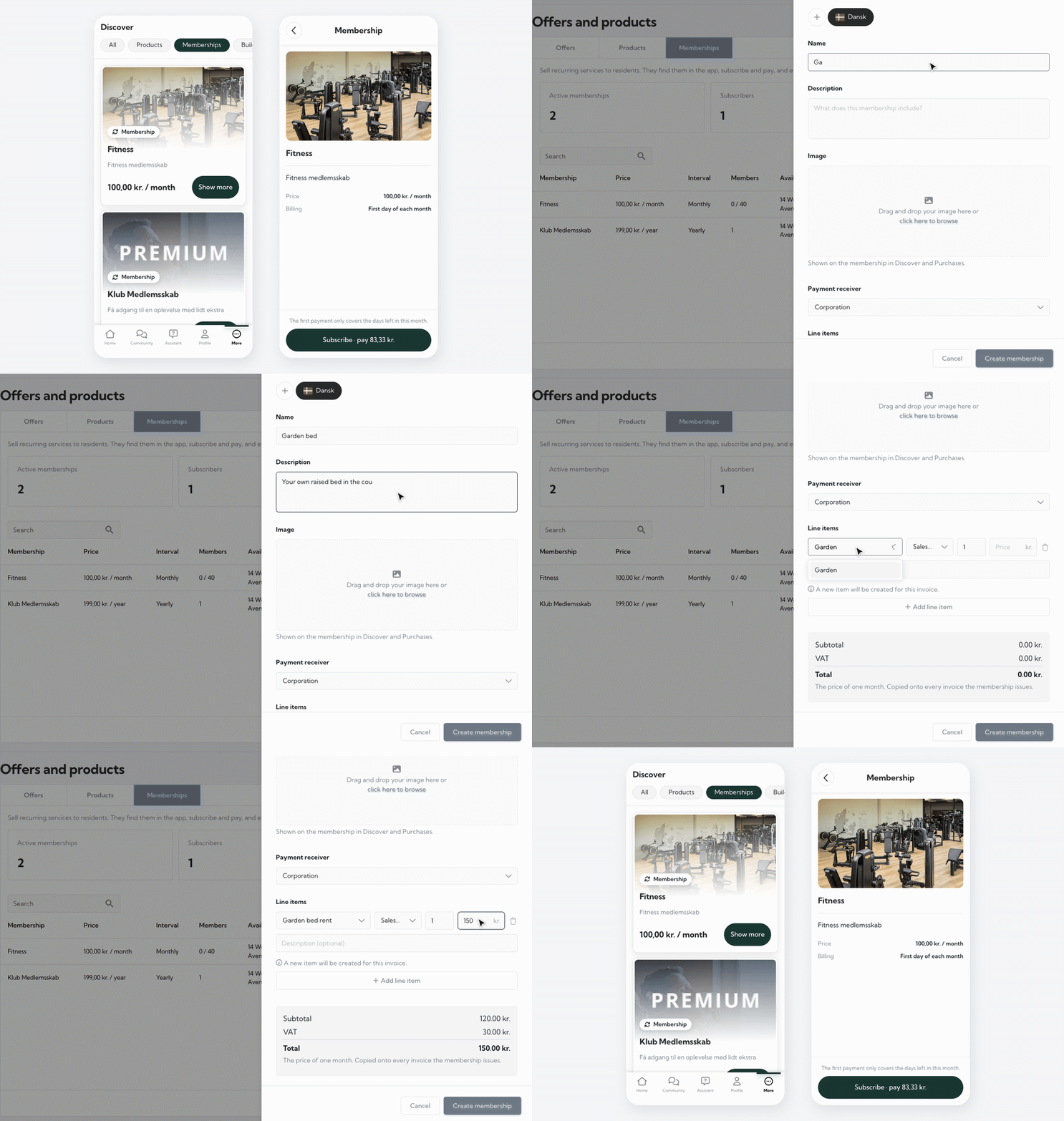
🏋️ Sell recurring services with Memberships
A gym, a garden bed, a hot desk in the lounge, weekly cleaning. Residents love these services, but billing them every month means spreadsheets, reminders and a lot of manual invoices.
With Memberships you set it up once. Choose what the membership costs, how often it's billed and who can see it. Residents find it in the app under Discover, subscribe and pay with the payment methods they already use. From then on, Hococo sends a new invoice every period, all by itself. 💳
You decide the details: a limited number of places (the app shows "Fully booked" when they're gone), whether the first invoice covers only the days left in the period, and a link to your terms. A membership can also give residents a role while they're subscribed, so gym members can be the only ones who book the gym.
Residents can see and cancel their memberships under Purchases, and they keep access until the end of the period they've paid for. You can add or remove members yourself in Admin Hub too, and put your memberships on the app's home screen.
Less invoicing. More time for the community. 🧡
Find it in Admin Hub → Community → Memberships.
Set up a membership in Admin Hub, and residents find it in the app under Discover.
🔁 Let Admin Hub take care of the routine work
A new tenant moves in, and someone should send a welcome message. A ticket sits unanswered for two days. A contractor hasn't replied. On a busy day, these things slip.
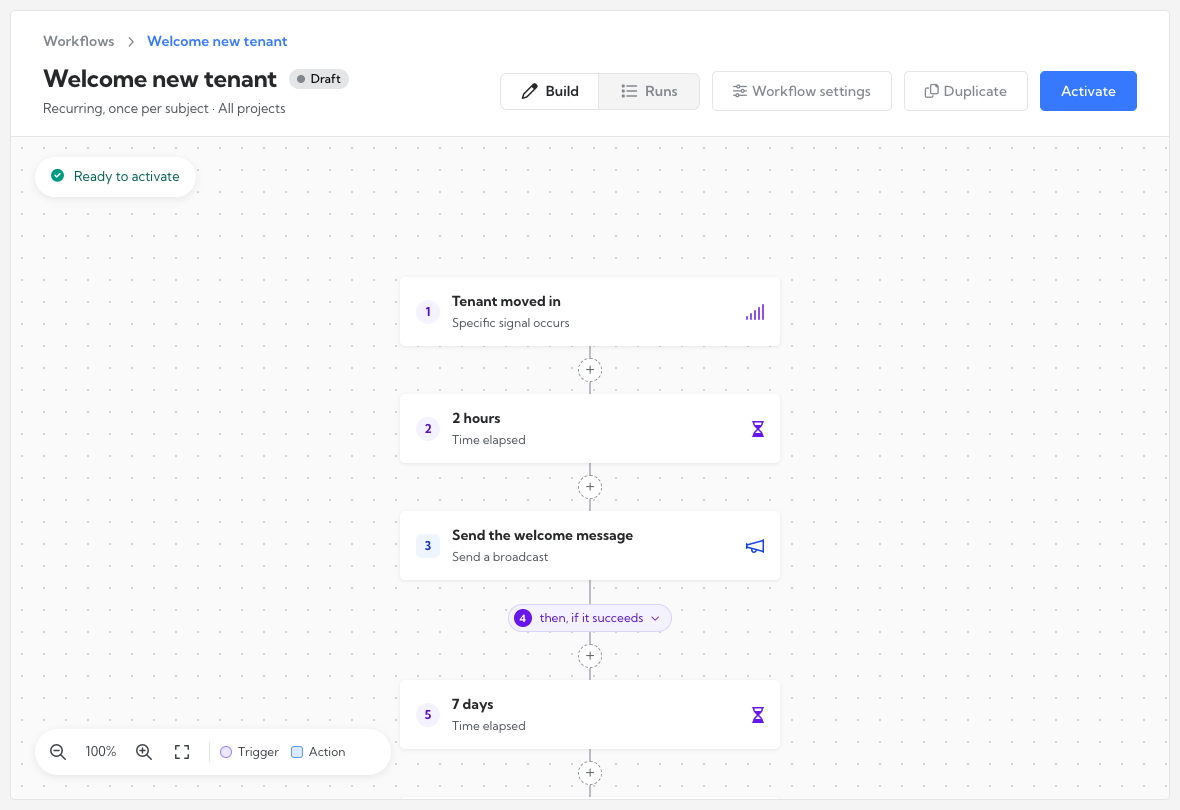
With Workflows you set it up once and Admin Hub does it every time. A workflow starts when something happens, like a tenant moving in or a ticket being created. It can wait or check something first, and then it does the work: sends a message, creates a task, ticket or work order, or tells a colleague.
You don't start from a blank page. Pick a ready-made template such as Welcome new tenant, Escalate unresolved ticket or Prepare move-out, check the steps and click Activate. Under Runs you can follow every workflow as it happens.
Every organisation can create up to five workflows for free, and upgrade to unlimited from the same page.
Find it in Admin Hub → Workflows.
The Welcome new tenant template: a tenant moves in, two hours later they get a welcome message.
🔐 Extra security with two-step login
Admin Hub holds a lot of personal information about your residents, so a password alone isn't always enough.
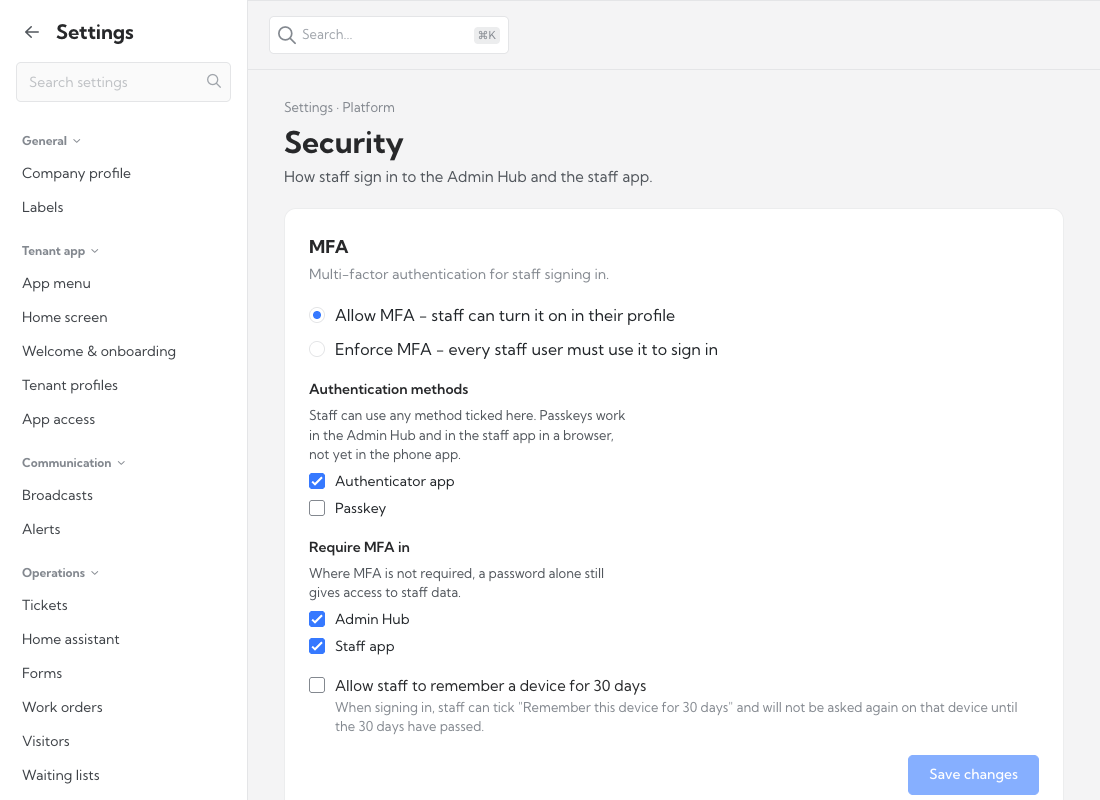
You can now turn on two-step login for your staff. After their password, staff confirm it's them with a code from an authenticator app (such as Google or Microsoft Authenticator) or with a passkey, like the fingerprint or face recognition on their computer. You decide whether it's optional or required for everyone, and whether staff may remember a device for 30 days.
It works in both Admin Hub and the staff app. If someone loses their phone, an admin can reset their login in a single click.
Nothing changes until you switch it on. 🛡️
Find it in Admin Hub → Settings → Security. Staff set up their own login under Profile → Security.
💬 Answer every ticket straight away with Auto-reply
When a resident reports a problem, the first thing they want to know is that someone has seen it.
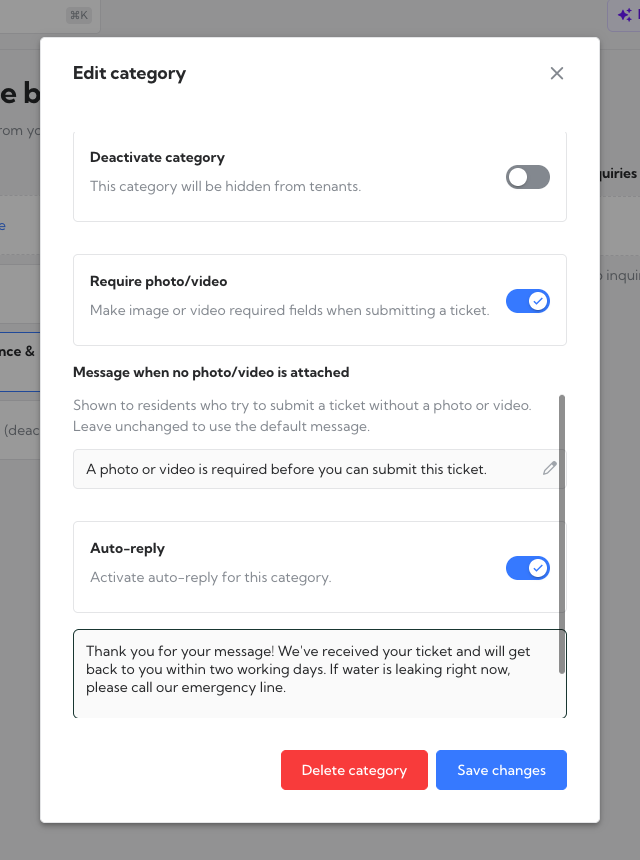
You can now add an automatic reply to each ticket category in the Knowledge Base. When a resident creates a ticket in that category, the reply appears in the ticket chat straight away, in the resident's own language, signed "Auto-reply" with your logo. Use it to set expectations ("We usually reply within two working days"), ask for photos, or explain that a technician may need to enter the apartment.
Your team still gets notified as usual, and the auto-reply is logged in the ticket's activity log.
Find it in Admin Hub → Help Desk → Knowledge base → edit a category → Auto-reply.
📋 Send forms straight to your residents
Need every resident to fill in a survey, confirm their contact details or sign up for something? Until now, they had to find the form themselves.
You can now send a form to the residents you choose: whole projects, buildings, single homes or segments. They see it as soon as they open the app, and you can also send it by email and push notification. Choose when it appears and when it disappears, and whether residents can skip it or must answer it.
You can see when a form was last sent, and send it again to ask everyone once more.
Building forms is easier too. The form builder has a cleaner, calmer look, and all the ways to share a form (link, website, personal links or straight to your residents) are now in one place. New ready-made templates help you get started with a tenant satisfaction survey or a termination form. ✍️
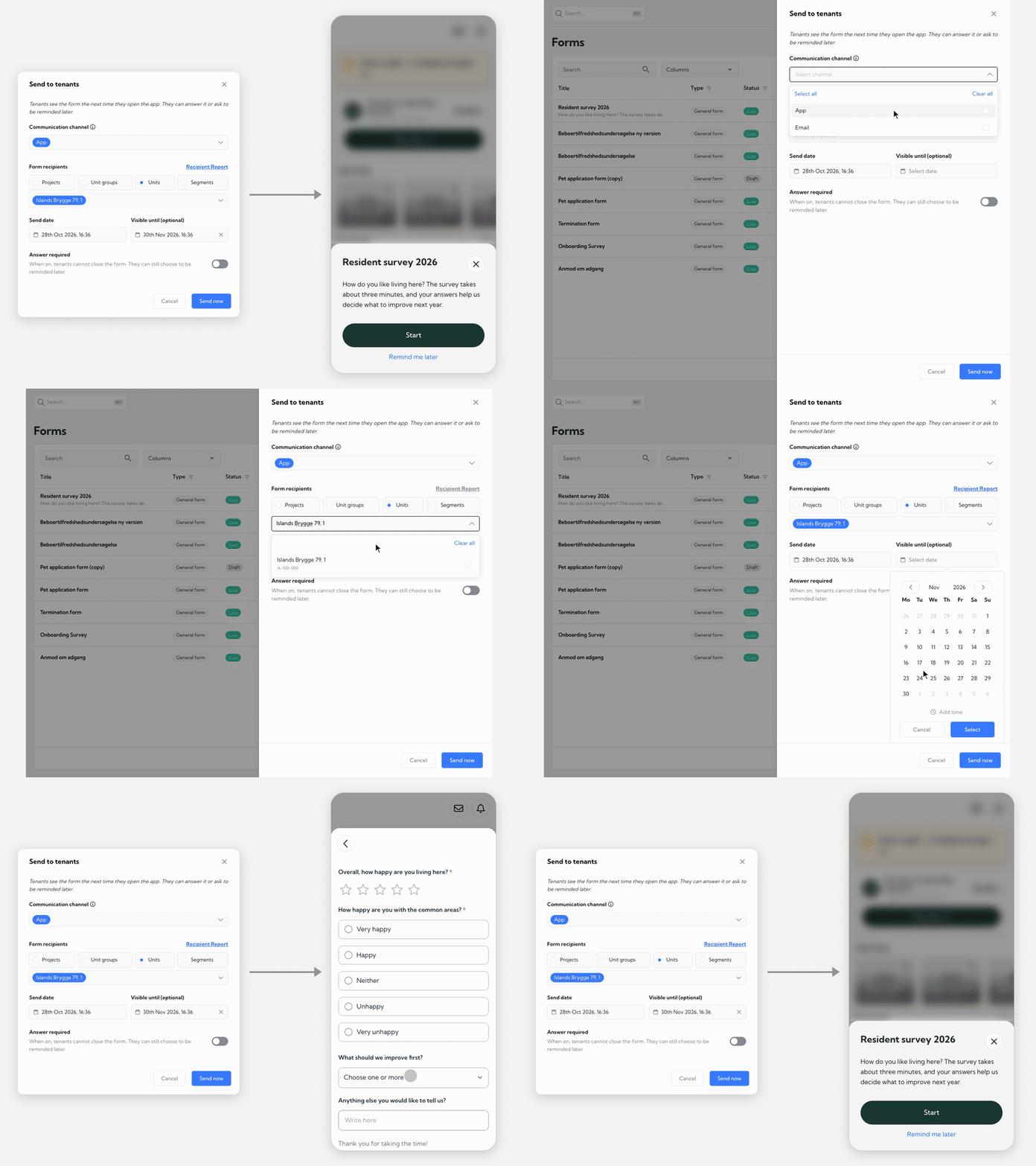
Find it in Admin Hub → Communication → Forms → ⋯ next to a live form → Share → Send to tenants.
🚪 Better visitor registration
Guests, carers, cleaners, a family member staying for the weekend. Knowing who's in the building matters.
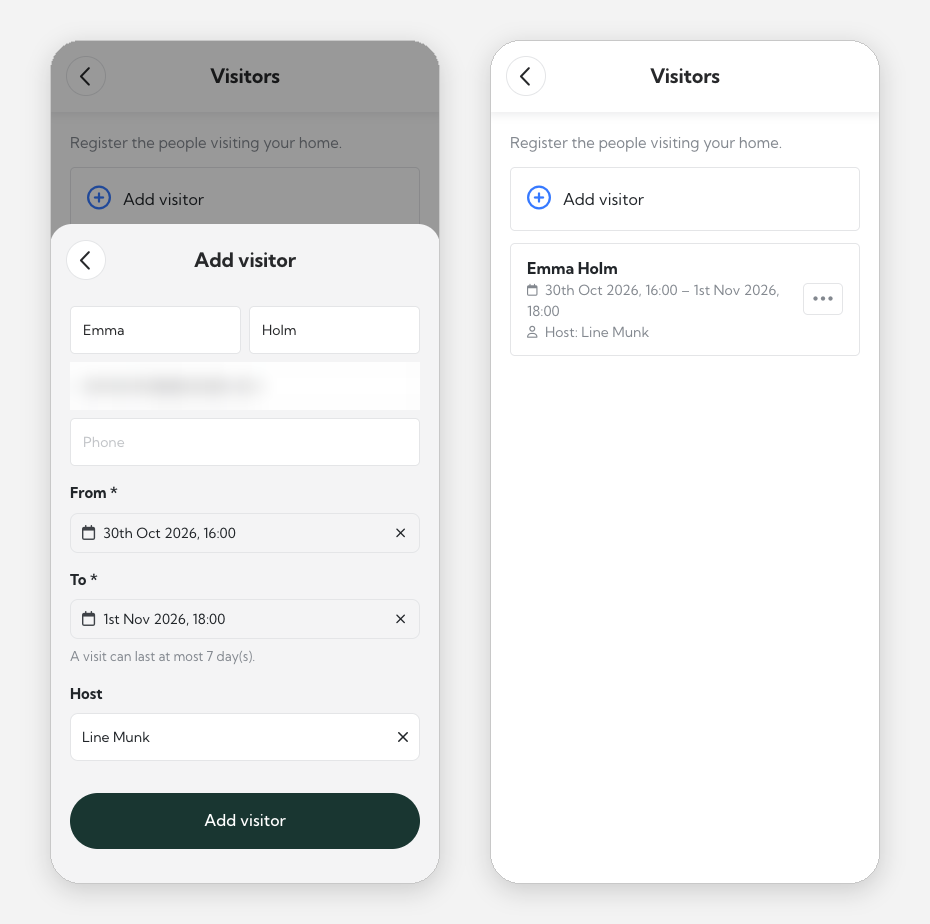
Visitors now have dates and times for their visit and an optional host. Staff can check visitors in and out from the Visitors list, filter by who's checked in, and find visitors in the search bar at the top of Admin Hub.
If you like, residents can register their own visitors from their profile in the app. You decide whether they may, how long a visit can last, and whether dates are required. Resident registration is off until you switch it on.
Find it in Admin Hub → Users → Visitors. Settings in Admin Hub → Settings → Visitors.
🧭 A tidier Admin Hub
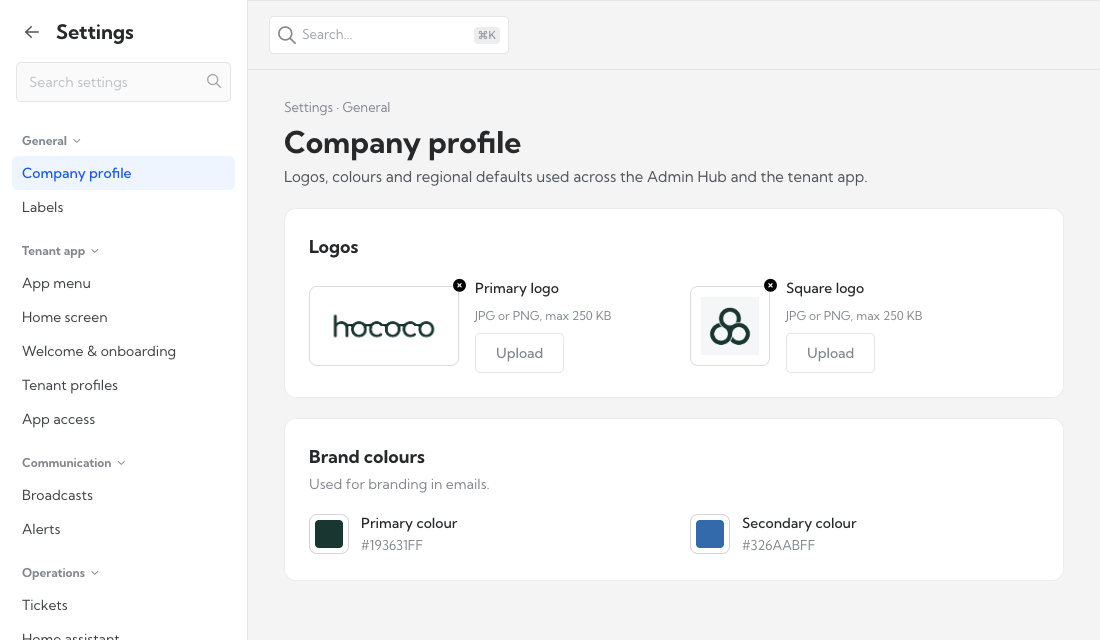
Settings used to be spread across many menus. Now they're all in one place. Click Settings and you get a dedicated menu, grouped into clear sections like Tenant app, Help desk, Finance and Security, with a search field to find any setting in seconds. Your existing settings haven't changed, only where you find them. Some options now have friendlier names, like "Allow comments on broadcasts".
We're also redesigning the side menu itself. It's more compact, can be collapsed completely, and lets you pin your favourite pages to the top. Try it today with the New menu button at the top of Admin Hub. You can switch back at any time.
Noteworthy enhancements ✨
🎫 Various improvements to the Help Desk
- Teams on tickets. Tickets now show which team they belong to, and you can filter and sort the ticket list by team. Pick a team on a ticket, and the Assignee list shows only that team's members.
- Tickets shared within a household. If you switch it on for a project, everyone living in the same home can see and reply to each other's tickets, not only the person who created them. You'll also find a new Tickets tab on each tenancy. Off until you switch it on in the project's ticket settings.
- Spot local changes in the Knowledge Base. A small yellow dot now shows when a project has its own local version of categories or questions, and how many.
📊 Working with lists in Admin Hub
- Arrange columns your way. Drag the columns of any table into the order you prefer. Admin Hub remembers it next time.
- Export more tables. Teams, Visitors, Unit groups, Tasks, Work orders, Units and Vendors can now be exported to CSV or Excel, just like Tickets.
- Addresses when choosing recipients. When you pick projects for a broadcast or event, each project now shows its address, and you can search by it.
📱 A fresh look in the resident app
- Documents and Contacts have a cleaner new design. Everything works as before.
- Residents who use the app on a computer can now type their PIN with the keyboard.
- Facilities that are there for information only, like a bike room, no longer look greyed out and unavailable. Residents only see that it can't be booked when they open it.
- The app is ready for the newest iPhone models.
And a lot more
- News in Admin Hub and the staff app. A new News section keeps your team up to date with what's new on the platform.
- Company details on invoices. Choose the trading name, address and VAT/CVR number that appear on your invoices. If a project has its own company, set its details on the project. Invoices you've already sent stay as they are. Settings → General → Company profile, and Company in each project's settings.
- Times to the nearest quarter of an hour. When you add a time to an event, broadcast, task or visitor, Admin Hub now suggests the nearest quarter of an hour instead of the exact minute.
- Payment method limits. Choose a minimum and maximum amount for each payment method, for example to offer a payment method only for larger amounts.
- Public API on request. The Public API page is now visible to every organisation and can be switched on as a paid add-on. If you already use the Public API, nothing changes.
- Clearer staff access. "Full access" is now its own option when you set up which projects a staff member can see.
- Faster Admin Hub. Pages you've visited recently now open straight away, with the latest data loading in the background.
- Data retention. Hococo can now delete old tenancy data automatically after an agreed number of years, as data protection rules require. Staff can see on each ended tenancy when its data is due to be deleted. Nothing is deleted for your organisation unless we agree a retention period with you.
We hope you enjoy the updates - and as always, we welcome your feedback. Our support team is here to help with any questions.
If you are interested in learning how Hococo can help you business and add value to your buildings, get in touch here.