Introducing Digital Signage
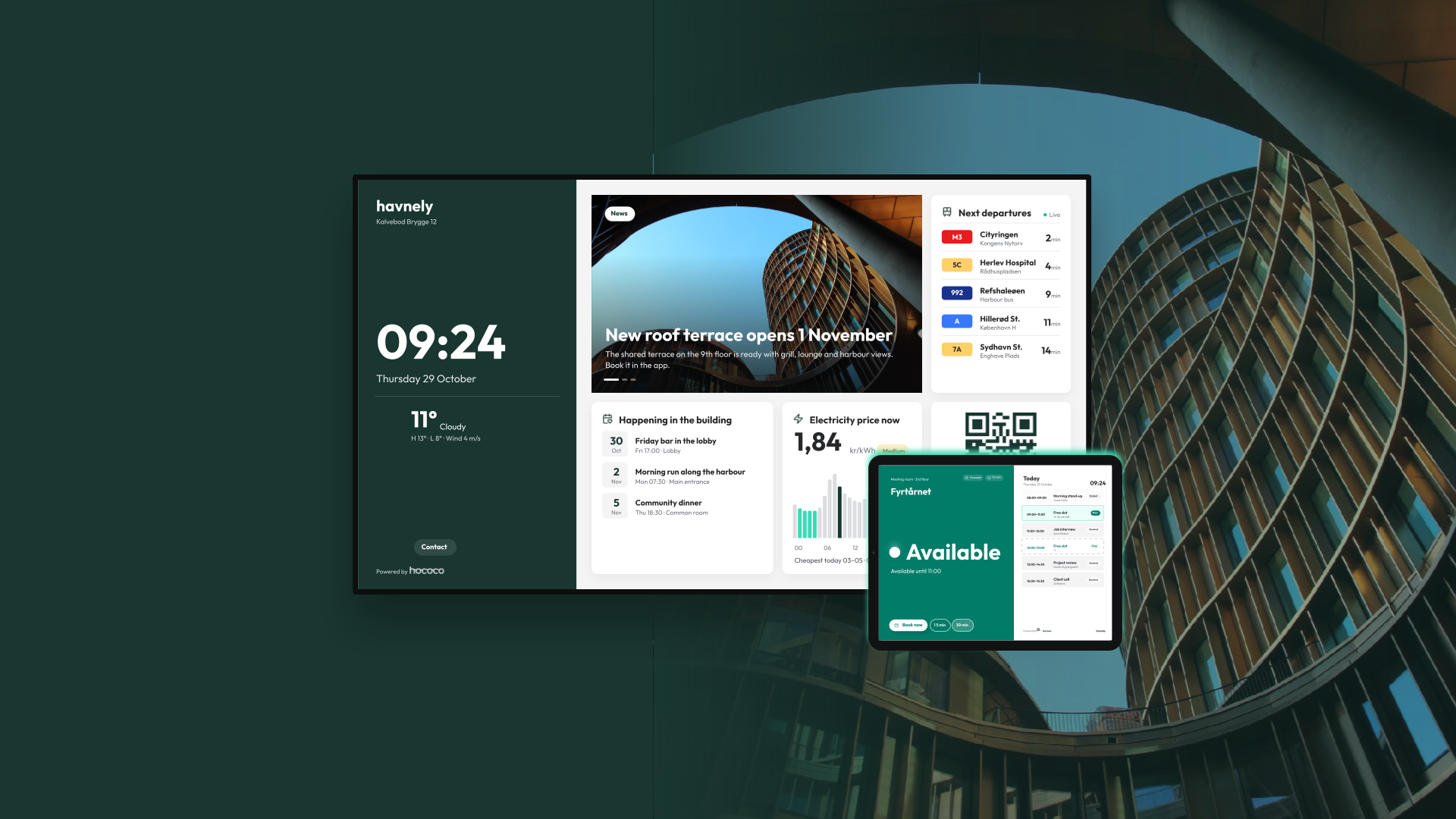
Digital signage that keeps itself up to date
Often residential buildings already have a screen in the lobby. Few of them are doing much.
You know the type. A TV by the mailboxes showing a welcome slide from move-in week. An information display by the elevator still announcing a summer barbecue in November. Someone set it up with good intentions, then the content went stale because keeping it current became one more job nobody owned.
The problem usually isn't the screen. It's that the screen runs on its own island, disconnected from everything else the building team already does.
The last thing you need is another system to feed
The usual answer to a dead lobby screen is a dedicated signage product. It has its own login, its own content library and its own schedule to manage. In practice that means writing the same announcement twice: once for residents in the app, once again for the screen.
We took the opposite approach. Digital Signage in Hococo doesn't ask you to create content for the screen. It reuses what you already publish.
When your team posts a news update in Admin Hub, it appears on the screen. When a shared facility is available to book, the screen shows it. There is no separate workflow to remember and no second place where things go out of date. The screen stays current because the work you were already doing keeps it current.
What you can put on the screen
You design each screen in Admin Hub with a drag-and-drop builder. Pick the building blocks that make sense for that spot in the building and arrange them how you like:
- Latest news from your building or portfolio, pulled straight from what you've already published
- Shared facilities, so residents see what's available to use
- A QR code residents can scan to report an issue on the spot
- Weather for the day ahead
- Public transport departures from nearby stops
- Electricity prices, useful for timing laundry or EV charging
- A clock
- Your own images and text for anything else
A screen by the front door might focus on transport and weather. One in the laundry room might lead with electricity prices and the issue-reporting QR code. That's not all, though. You can also add check-in and check out functionality for your visitors and add a booking screen outside your meeting room, allowing for easy bookings on the go and also showing future availability. Each location can do a different job and the opportunities are endless.
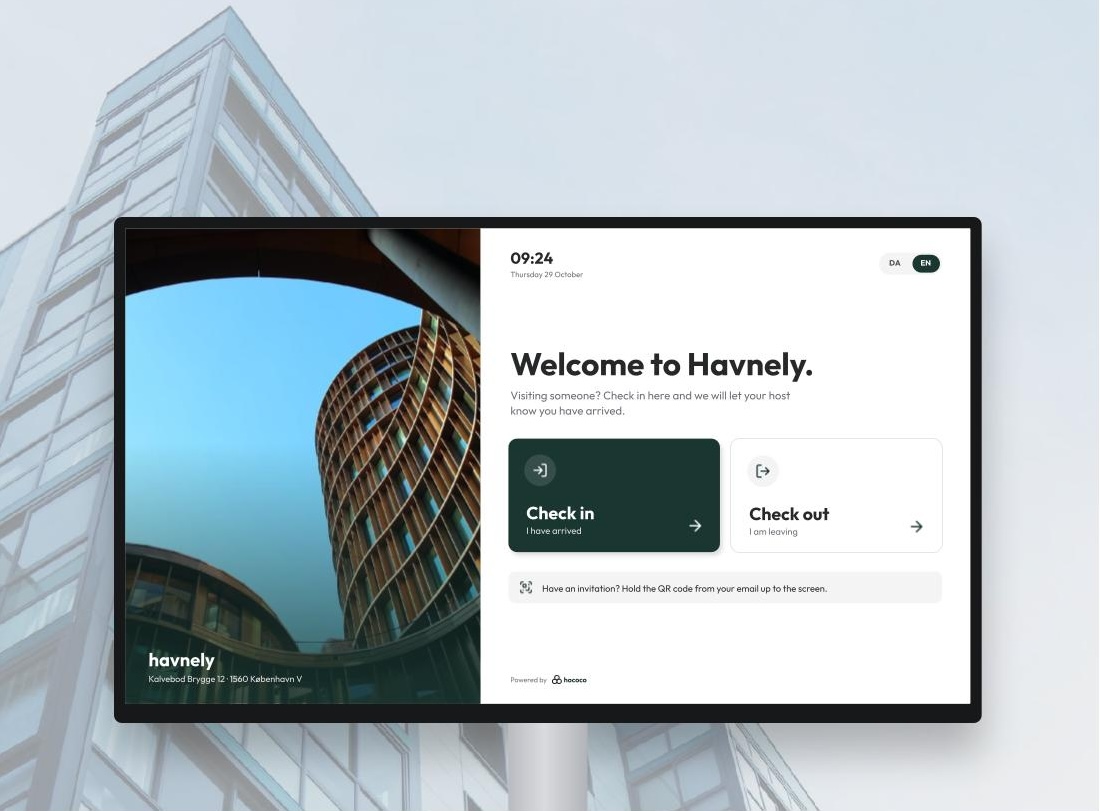
A screen that does something, not just shows something
A static noticeboard asks residents to read. A live screen gives them a reason to look.
Departures update in real time. Electricity prices change through the day. News appears as soon as it's published. Because the information keeps moving, residents learn that the screen is worth a glance on the way out the door.
It also works in both directions. The QR code turns a passing thought, like a flickering light in the stairwell, into a reported issue in a few seconds. And residents can switch the screen's language themselves, which matters in buildings where not everyone reads the local language comfortably.
Getting it running
There doesn't have to be any special hardware involved. The screen runs on any display with a web browser, so the TV already hanging in your lobby will usually do. A smart TV with a built-in browser, or a basic TV with a small streaming stick or mini PC attached, is enough. (Of course, Hococo can also provide the hardware through our partners!)
Setting up a screen looks roughly like this:
- Design the layout in Admin Hub, choosing the blocks that fit that location.
- Open the screen's link in the display's browser and set it to full screen.
- Leave it running.
From then on, any change you make in Admin Hub shows up on the screen automatically. Nobody needs to visit the building to update it, and nobody needs to remember that the screen exists.
Why it matters to asset managers
For asset managers, the lobby screen is more than a resident amenity. Several of the things it shows are exactly what sustainability certifications look for.
- Public transport departures. BREEAM rewards buildings that give occupants up-to-date local transport information in a convenient spot, such as a real-time display, so they can plan their trips around public transport rather than the car.
- Electricity prices. Showing when power is cheap, and usually greener, nudges residents to shift laundry, dishwashers and EV charging. That supports the occupant energy awareness and engagement criteria found in schemes like BREEAM In-Use.
- News and community events. A visible, current channel for building news and resident activities is concrete evidence of tenant engagement, which features in frameworks like GRESB and wellbeing standards like WELL.
These points add up in assessments that directly affect a building's valuation, financing terms and appeal to institutional investors. And because the screen runs on content your team already maintains, the evidence stays current without extra work.
The exact credits depend on the scheme, its version and how your assessor reads the requirements. It's worth checking with them which criteria the screen can support in your building.
Why the flexibility matters
Buildings change. A new bus line opens nearby. A shared roof terrace becomes bookable. The resident mix shifts and a second language becomes more useful than the first. A screen that's locked into one setup falls behind quickly. One you can rearrange in a few minutes keeps up.
That flexibility comes from the same idea behind the rest of Hococo: information should be entered once and then be useful everywhere it's needed. News written for the resident app shouldn't stop at the app. Facility data shouldn't sit in one module. The lobby screen is simply another place where that information turns up for the people who live there.
For building teams, the result is one less thing to maintain. For residents, it's a screen that's actually worth looking at.
Getting started
Digital Signage is switched on per organisation. If you'd like to try it in one of your buildings, get in touch and we'll help you set up your first screen.
Book an intro call here